

Your team may not be injured. But that does not mean your workplace is comfortable, productive, or ergonomically sound.
You can see a broken monitor. You can see a damaged chair. You can see an obvious workplace incident.
What you cannot always see is the employee subtly shifting in their seat, lifting their shoulders, bracing their lower back, or stretching their legs under the desk every few minutes.
That is micro-tension.
It is small enough to ignore in the moment, but persistent enough to drain energy across an entire workday.
And chances are, you have experienced the result: the 3 PM slump, reduced concentration, more mistakes, slower decision-making, and a team that feels physically tired before the day is over.
You’re not alone. Office fatigue is often treated as an individual wellbeing issue when it may actually be a workstation-design issue.
The overlooked starting point? Foot support.
The invisible fatigue problem hiding in plain sight
When organisations review ergonomic spending, the conversation usually begins with the largest items:
- Premium task chairs
- Sit-stand desks
- Monitor arms
- External keyboards and mice
- Laptop stands
- Lighting and acoustic improvements
These investments matter.
But here’s something most people don’t realise: a workstation can have excellent equipment above the desk and still fail to support the person sitting in it.
If an employee’s feet do not rest comfortably, their entire seated position can become unstable.
They may not report an injury. They may not submit a formal complaint. They may simply work with a low level of physical discomfort that builds throughout the day.
That discomfort can show up as:
- Constant fidgeting or repositioning
- Legs that feel heavy or restless
- Tightness through the hips or lower back
- Tension in the neck and shoulders
- Difficulty maintaining focus late in the day
- Needing more breaks just to feel comfortable
- End-of-day fatigue that feels disproportionate to the work completed
Most people assume productivity loss begins when someone takes sick leave.
But it often begins much earlier : when someone is present, logged on, and working below their best because their body is using energy to compensate.
That is the invisible cost.
Why unsupported feet affect the whole body
Let’s break it down 👇
Your body works as a connected system. Physiotherapists and ergonomists often describe this as a kinetic chain: movement or instability in one area can influence the position and workload of other areas.
When your feet are unsupported, the chain can look something like this:
-
Your feet lose a stable base.
They may dangle, reach forward, or search for the chair base or a nearby object. -
Your pelvis shifts position.
Without comfortable support beneath the feet, your pelvis may tilt forward or slide into a less stable position. -
Your lower back compensates.
The lumbar spine may increase its sway or work harder to stabilise your torso. -
Your upper body adjusts to keep your eyes level.
Your neck and shoulders can tense as you lean, brace, or subtly lift your posture. -
Your muscles stay switched on.
Instead of supporting you efficiently, they remain engaged to manage the imbalance.
This is not about blaming employees for “bad posture”.
It is about recognising that people often cannot maintain a comfortable, neutral sitting position when the workstation does not support their body proportions.
A supported foundation = a supported spine.
That does not mean a footrest magically fixes every ergonomic risk. It means foot support is a practical part of the complete workstation equation : and one that is frequently missed.
The eight-hour multiplication effect
A few seconds of tension may seem insignificant.
But multiply it across:
- 8 hours a day
- 5 days a week
- Approximately 48 working weeks a year
- Every employee using an unsuitable setup
That is a substantial amount of repeated physical compensation.
The issue is not necessarily one dramatic movement. It is the accumulation of small, low-level demands:
- Holding the shoulders slightly higher
- Bracing the lower back
- Pressing the toes into the floor
- Shifting weight from one hip to the other
- Leaning forward to stabilise
- Pausing work to stretch or reset
By mid-afternoon, those demands can contribute to physical fatigue and mental fatigue at the same time.
Research into computer-based and remote work consistently identifies the neck, shoulders, lower back, and other regions as common areas of discomfort. A review published in Frontiers in Public Health links telework-related musculoskeletal problems with prolonged sitting, non-neutral postures, unsuitable equipment, long hours, and insufficient breaks.
One recent workforce synthesis reports that 52% of remote workers experience new or worsened musculoskeletal symptoms. While the exact figure varies between surveys and populations, the overall message is clear: workstation comfort is a serious WHS and employee wellbeing consideration.
For your team, the question is not simply, “Has anyone been injured?”
It is also:
“How much effort are people spending just trying to sit comfortably?”
Why visible injuries get action : but micro-tension gets missed
A visible injury creates urgency.
There is an incident report, a medical appointment, a workers’ compensation process, or a clear request for a replacement item.
Micro-tension is different. It is often normalised.
Employees say:
- “My back always feels like this by the afternoon.”
- “I just need to stretch more.”
- “I can work around it.”
- “The chair is fine : I’m probably just tired.”
- “That is what working at a desk feels like.”
But “normal” does not necessarily mean acceptable.
When discomfort is repeated every working day, it can affect more than physical comfort. It may contribute to reduced engagement, poorer concentration, presenteeism, and a growing perception that work is exhausting.
The research on telework-related musculoskeletal risk also highlights the role of prolonged static postures, poorly adjusted seats, unsuitable home-office equipment, and limited organisational support.
For WHS and HR teams, this creates a valuable opportunity:
Move from reacting to reported pain towards identifying and reducing the conditions that create it.
What most footrests get wrong
A traditional floor footrest can be useful : but only if it stays in the right place.
Here’s the catch: your chair moves, while the floor footrest does not.
Every time you swivel, roll backwards, lean, or adjust your position, the distance between your feet and the footrest can change. You may end up reaching for it, pushing it away, or abandoning it altogether.
That creates a familiar cycle:
- The footrest starts in the right position.
- The employee moves during normal work.
- The footrest is no longer aligned with the chair.
- Support becomes inconsistent.
- The employee returns to an unsupported position.
Most footrests provide a platform.
They do not always solve the real problem: keeping support with the person.
For a busy workplace, equipment that is difficult to adjust, easy to misplace, or incompatible with flexible seating may have low practical value : even if it looks good in a catalogue.
The smarter approach: optimise what you already have
Proactive ergonomics is not about buying more furniture for the sake of it.
It is about making the furniture and equipment you already own work better for the people using it.
That might mean:
- Adjusting chair height
- Bringing the monitor to eye level
- Supporting the lower back
- Keeping the keyboard and mouse within easy reach
- Encouraging regular movement and breaks
- Providing a stable foot platform where needed
This is where a chair-mounted footrest can add strategic value.
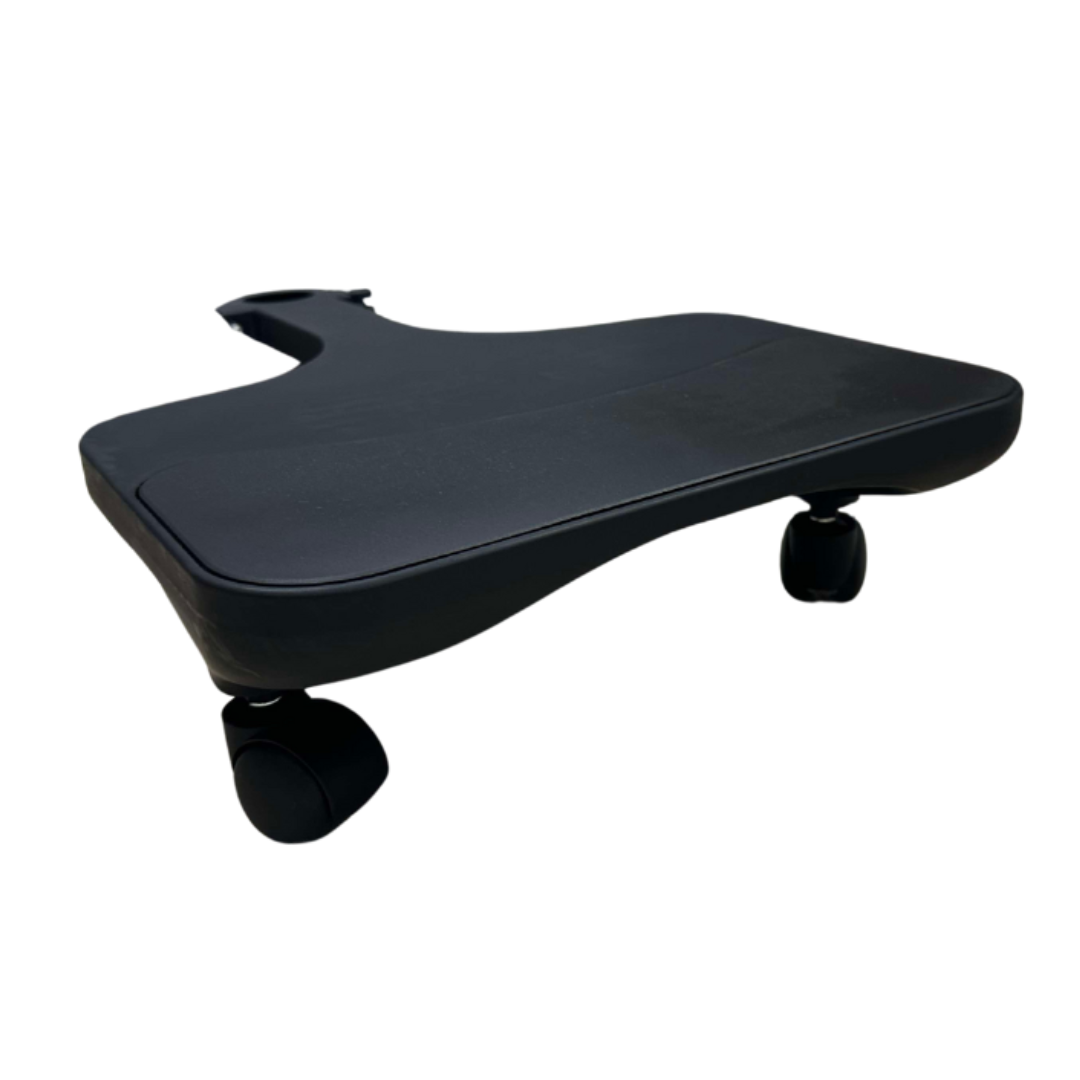
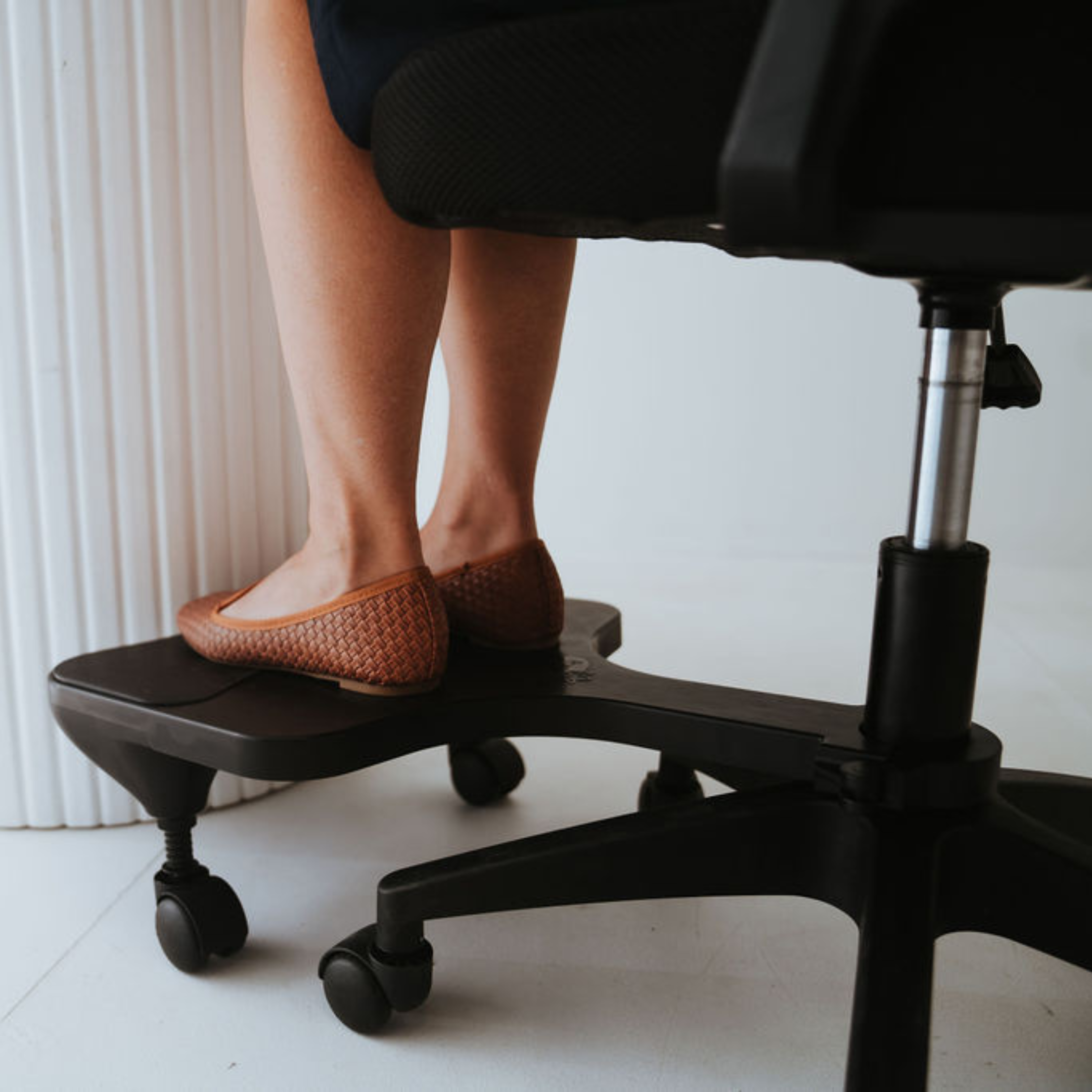
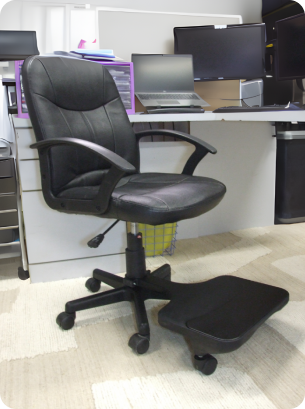
Rather than replacing a premium office chair, PostureAssist is designed to complement it. It clips directly to the central stem of a compatible swivel office chair and moves with the chair as the user swivels or shifts.
That means support stays connected to the workstation.
How PostureAssist supports your existing ergonomic investment
PostureAssist is designed to help create a more stable lower-body foundation without requiring a complete workstation overhaul.
Its workplace-relevant features include:
- Chair-mounted support: The footrest attaches directly to the chair instead of sitting loose on the floor.
- Movement with the user: Support follows the chair when the user swivels or shifts.
- Adjustable positioning: Employees can set the height to suit their body and chair.
- Natural seated alignment: The design helps users position their feet comfortably while keeping the knees at a more natural angle.
- Simple installation: Most users can attach it with minimal assembly.
- Durable construction: It is made from strong, injection-moulded ABS plastic for everyday use.
- Australian design and manufacturing: It is proudly designed and made in Australia.
It is particularly relevant for:
- Employees whose feet do not reach the floor comfortably
- Smaller-statured workers using standard-height desks
- Home workers with limited space
- Shared workstations with different user heights
- Teams looking to improve comfort without replacing every chair
- Businesses building a practical ergonomic equipment policy
PostureAssist is not a substitute for workstation assessment, movement breaks, or professional advice where an employee has ongoing pain.
It is a targeted add-on that helps address a commonly overlooked gap.
The business case for proactive ergonomics
Ergonomics is often treated as a cost centre because the benefit can be difficult to see immediately.
But prevention has value even when nothing dramatic happens.
A comfortable, better-supported employee may be more able to:
- Stay focused through longer work blocks
- Maintain energy across the day
- Avoid unnecessary discomfort-related interruptions
- Participate more consistently in meetings
- Work effectively from home or in the office
- Use existing furniture more successfully
Research and case-study reviews commonly report positive financial outcomes from ergonomic interventions. The frequently cited $3–$6 return for every $1 invested is drawn from ergonomic intervention case studies and ROI summaries, including analysis associated with the Washington State Department of Labor & Industries : not a universal guarantee for every product or workplace.
That distinction matters.
The strongest business case is not “buy this item and productivity will automatically increase.”
It is:
Identify the risk, provide a suitable intervention, support correct use, and measure the outcome.
A 2025 benefits survey summary also reports that 58% of remote-heavy employers offer some form of ergonomics support, showing that ergonomic equipment is increasingly viewed as part of a modern employee experience rather than an optional extra.
For procurement teams, that creates a simple test:
- Does the product address a real workstation gap?
- Will employees actually use it?
- Does it work with existing furniture?
- Is it easy to install and adjust?
- Can it support both office and remote workers?
- Does it offer clear value over replacing larger items?
On those measures, a chair-mounted footrest deserves a place in the conversation.
A practical checklist for your next workstation review
If you manage WHS, HR, facilities, or procurement, ask your team:
- Do your feet rest flat and comfortably while seated?
- Do you regularly shift position to find support?
- Do your legs feel heavy or restless by the afternoon?
- Does your lower back become uncomfortable during long work blocks?
- Do you raise your shoulders or lean forward while working?
- Does your floor footrest move away when your chair moves?
- Can your current setup accommodate different employee heights?
- Are remote workers receiving practical guidance and equipment support?
If employees answer “yes” to several of these questions, foot support may be one of the missing pieces in your ergonomic program.
Simple as that.
A better workstation does not always require a new desk or a more expensive chair. Sometimes, it starts with bringing the foundation back into alignment.
Reduce the hidden drain of office fatigue
Micro-tension is easy to miss because it rarely arrives as a single, obvious event.
It builds quietly through unsupported feet, awkward angles, static sitting, and repeated compensation. Over time, it can contribute to the fatigue your team feels long before the workday ends.
The solution is not to expect employees to “sit better” through willpower.
The solution is to give them a workstation that makes supported sitting easier.
PostureAssist helps maximise your existing chair investment by keeping adjustable foot support connected to the user : whether they are working in the office, at home, or across a shared workspace.
Support the feet. Stabilise the posture. Protect the workday.
👉 Explore the PostureAssist Foot Rest
For workplace quantities, ergonomic program discussions, or a corporate demonstration, contact the PostureAssist team to discuss your requirements.
0 comments